PARALLEL(DOCS) Optical Printer Control System PARALLEL(DOCS)
NAME
parallel - parallel port pinout and DOS monitoring tool
PARALLEL PORT PINOUT CHART
PIN I/O NAME PORT MASK (hex)
-----------------------------------------------------
1 out strobe 3be/37a !01
2 out data0 3bc/378 01
3 out data1 3bc/378 02
4 out data2 3bc/378 04
5 out data3 3bc/378 08
6 out data4 3bc/378 10
7 out data5 3bc/378 20
8 out data6 3bc/378 40
9 out data7 3bc/378 80
10 in acknow 3bd/379 40
11 in busy 3bd/379 !80
12 in out of pap 3bd/379 20
13 in select 3bd/379 10
14 out autofeed 3be/37a !02
15 in error 3bd/379 08
16 out init 3be/37a 04
17 out select 3be/37a !08
18-25 ground ground - -
PARALLEL PORT MONITOR PROGRAM
The OPCS software comes with parallel.exe, a program that monitors
the realtime status of the IBM PC's parallel ports. Run 'parallel.exe'.
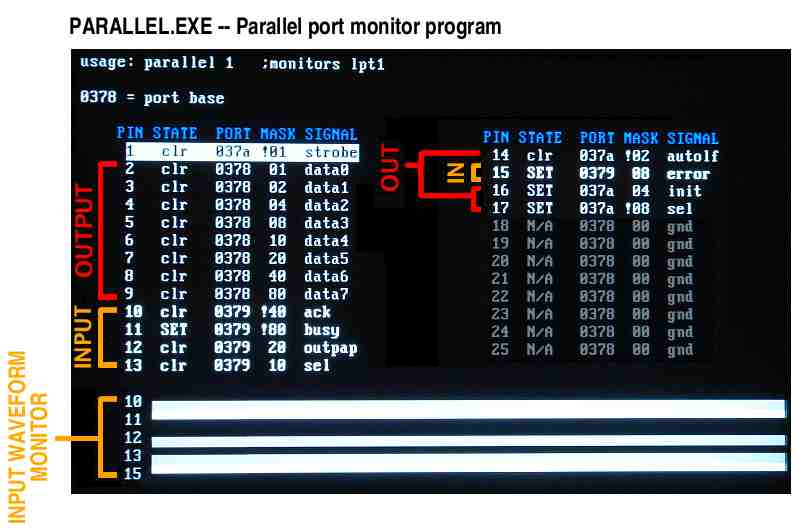 USAGE
parallel [-h] [port|lpt#]
EXAMPLES
parallel - monitor LPT1 (default)
parallel 1 - monitor LPT1
parallel 2 - monitor LPT2
parallel 3 - monitor LPT3
parallel 378 - monitor parallel port at base address 0378h
parallel -h[elp] - help screen
KEYS
UP/DOWN - move edit cursor up/down
ENTER - toggles state of output (when cursor on an output)
ESC - quit program
While the edit cursor is positioned on an input, the speaker makes
a 3000 HZ tone if the input is HIGH, and makes no sound if LOW.
SOURCE
The GPL3 Turbo-C source code for the parallel port program can be
found at: http://github.com/erco77/parallel-dos
The binary "parallel.exe" can be downloaded from:
http://seriss.com/opcs/ftp/
ORIGIN
Gregory Ercolano, Los Feliz California xx/xx/1988
USAGE
parallel [-h] [port|lpt#]
EXAMPLES
parallel - monitor LPT1 (default)
parallel 1 - monitor LPT1
parallel 2 - monitor LPT2
parallel 3 - monitor LPT3
parallel 378 - monitor parallel port at base address 0378h
parallel -h[elp] - help screen
KEYS
UP/DOWN - move edit cursor up/down
ENTER - toggles state of output (when cursor on an output)
ESC - quit program
While the edit cursor is positioned on an input, the speaker makes
a 3000 HZ tone if the input is HIGH, and makes no sound if LOW.
SOURCE
The GPL3 Turbo-C source code for the parallel port program can be
found at: http://github.com/erco77/parallel-dos
The binary "parallel.exe" can be downloaded from:
http://seriss.com/opcs/ftp/
ORIGIN
Gregory Ercolano, Los Feliz California xx/xx/1988