PRO(OPCS) Optical Printer Control System PRO(OPCS)
NAME
pro - run the projector so many frames forward or reverse
pro2 - for two-headed printers, runs projector #2
USAGE
pro [frame spec] # run main projector fwd or reverse
pro2 [frame spec] # run projector2
EXAMPLES
pro 12 # run projector 12 frames forward
pro -12 # run proj 12 frames in reverse
pro 54'11 # run proj 54 feet 11 frames
pro >-32 # run proj TO counter frame '-32'
pro >34'8 # run proj TO counter '34 feet 8 frames'
pro (sqrt(9)+1) # run proj 4 frames (3+1)
DESCRIPTION
Simply, this command will shoot frames on the projector. Negative
numbers will shoot in reverse. A number indicates the number of
frames to shoot.
If the number of frames is preceded by a '>', this indicates that
the projector should 'goto' that frame number as shown on the
projector's counter. Values can also be specified as feet/frames
or as a mathematical expression (as shown above).
For dual headed printers, the PRO2 command will run the second
projector. And yes, for compatibility there is a PRO1 command,
which is the same as the PRO command.
IMPORTANT NOTES
The projector always tries to run at its fastest speed. See the
SPD(OPCSDEFS) command for setting the projector's fast speed.
Running the projector alone will have no effect on fades or dissolves,
and the viewer may be open during projector runs without causing
'VIEWER OPEN' errors.
ALLSTOP
Hitting the ALLSTOP button, usually the (`) key, will halt the
motors at the nearest frame. ALLSTOP is safe during shooting;
it does not affect exposure, and always leaves the shutter closed
after stopping. The allstop key can be redefined by ALLSTOP(OPCSDEFS).
COUNTER OVERFLOWS
The software internally manages frame numbers in 32-bits,
and therefore can handle values in the range of +/-2 billion.
However, the counter /display/ has a digit limit, and the
counters will 'clock over' (similar to a car's odometer)
if the number of digits goes beyond the display's limits.
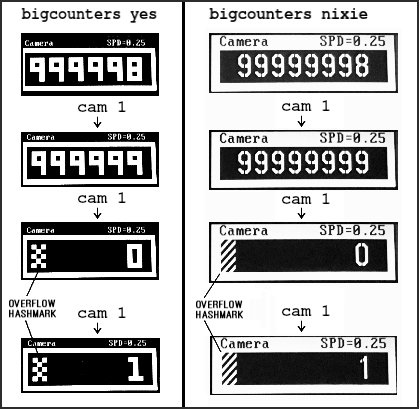
For 'bigcounters yes' (See BIGCOUNTERS(OPCSDEFS)), the limit
is 6 digits, i.e. -99,999 thru 999,999.
For 'bigcounters nixie', in K2.10 and up supports 8 digits,
i.e. -9,999,999 thru 99,999,999.
In either case, when the counter overflows, it 'clocks over'
to zero. In version K2.10 and up, a hash flag appears to the
left of the counters warning of counter overflow, e.g.
 ..or in "ASCII art", that would be:
######################################################################
#### ## ## ##
### ## ## #### ##
## ## ## # ## ## ##
## ## ## ## ## ## ##
#### ## ## ## ## ##
### ## ## ## ## ##
## ## ## # ## ## ##
## ## ## ## #### ##
#### ## ## ##
######################################################################
Similarly, negative underflows (counts below zero) unclock to
zero displaying a negative sign prefix.
For 'bigcounters yes', counter progression works this way, where
'//' represents the hashmark:
Actual Frame 'bigcounter yes' Display
------------ ------------------------
-100,002 // -2 <-- wraps to -2, shows hashmark
-100,001 // -1 <-- wraps to -1, shows hashmark
-100,000 // 0 <-- wraps to -0, shows hashmark
-99,999 -99,999
-98,999 -98,999
: :
-1 -1
0 0
1 1
: :
999,998 999,998
999,999 999,999
1,000,000 // 0 <-- wraps to 0, shows hashmark
1,000,001 // 1 <-- wraps to 1, shows hashmark
: :
For 'bigcounters nixie', in version K2.10 and up, counter progression
works this way:
Actual Frame 'bigcounters nixie' Display
------------ ---------------------------
: :
-10,000,002 // -2 <-- wraps to -2, shows hashmark
-10,000,001 // -1 <-- wraps to -1, shows hashmark
-10,000,000 // -0 <-- wraps to -0, shows hashmark
-9,999,999 -9,999,999
-9,999,998 -9,999,998
: :
-1 -1
0 0
1 1
: :
99,999,998 99,999,998
99,999,999 99,999,999
100,000,000 // 0 <-- wraps to 0, shows hashmark
100,000,001 // 1 <-- wraps to 1, shows hashmark
100,000,002 // 2 <-- wraps to 2, shows hashmark
: :
This 'clock over' behavior is only true of the display..
the software still internally keeps track of actual positions,
so that commands like 'cam >2000000' will still work correctly.
Note that 'bigcounters small' and 'bigcounters mocon' does not
clip digits at all, and can display the full abilities of 32bit
numbers.
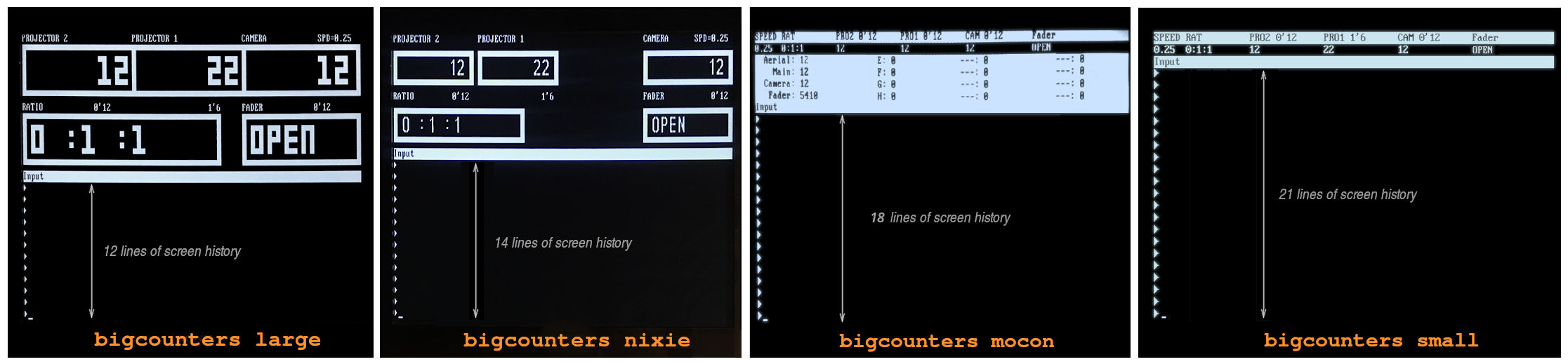
> Use 'bigcounters small' to maximize operator's screen history
(21 lines of screen history)
> Use 'bigcounters mocon' monitors all channels for motion control moves.
(18 lines of screen history)
> Use 'bigcounters nixie' for normal printing and medium sized counters.
(14 lines of screen history)
> Use 'bigcounters large' for normal printing and largest counters.
(12 lines of screen history)
..or in "ASCII art", that would be:
######################################################################
#### ## ## ##
### ## ## #### ##
## ## ## # ## ## ##
## ## ## ## ## ## ##
#### ## ## ## ## ##
### ## ## ## ## ##
## ## ## # ## ## ##
## ## ## ## #### ##
#### ## ## ##
######################################################################
Similarly, negative underflows (counts below zero) unclock to
zero displaying a negative sign prefix.
For 'bigcounters yes', counter progression works this way, where
'//' represents the hashmark:
Actual Frame 'bigcounter yes' Display
------------ ------------------------
-100,002 // -2 <-- wraps to -2, shows hashmark
-100,001 // -1 <-- wraps to -1, shows hashmark
-100,000 // 0 <-- wraps to -0, shows hashmark
-99,999 -99,999
-98,999 -98,999
: :
-1 -1
0 0
1 1
: :
999,998 999,998
999,999 999,999
1,000,000 // 0 <-- wraps to 0, shows hashmark
1,000,001 // 1 <-- wraps to 1, shows hashmark
: :
For 'bigcounters nixie', in version K2.10 and up, counter progression
works this way:
Actual Frame 'bigcounters nixie' Display
------------ ---------------------------
: :
-10,000,002 // -2 <-- wraps to -2, shows hashmark
-10,000,001 // -1 <-- wraps to -1, shows hashmark
-10,000,000 // -0 <-- wraps to -0, shows hashmark
-9,999,999 -9,999,999
-9,999,998 -9,999,998
: :
-1 -1
0 0
1 1
: :
99,999,998 99,999,998
99,999,999 99,999,999
100,000,000 // 0 <-- wraps to 0, shows hashmark
100,000,001 // 1 <-- wraps to 1, shows hashmark
100,000,002 // 2 <-- wraps to 2, shows hashmark
: :
This 'clock over' behavior is only true of the display..
the software still internally keeps track of actual positions,
so that commands like 'cam >2000000' will still work correctly.
Note that 'bigcounters small' and 'bigcounters mocon' does not
clip digits at all, and can display the full abilities of 32bit
numbers.
> Use 'bigcounters small' to maximize operator's screen history
(21 lines of screen history)
> Use 'bigcounters mocon' monitors all channels for motion control moves.
(18 lines of screen history)
> Use 'bigcounters nixie' for normal printing and medium sized counters.
(14 lines of screen history)
> Use 'bigcounters large' for normal printing and largest counters.
(12 lines of screen history)
 BUGS
See COUNTER note above.
SEE ALSO
PRO(OPCS) - run frames on the projector (pro2 also)
CAM(OPCS) - run frames on the camera
SEEK(OPCS) - run the camera/projector at slewing speeds
AUTOFILT(OPCS) - enable/disable the auto-wedging filter wheel
FEED(OPCS) - feed motion control moves to motors every camera frame
MATH(DOCS) - math expressions (for use in frame specifications)
SYNTAX(OPCS) - Online calculator and OPCS math expression syntax
VELREP(OPCSDEFS) - special purpose velocities for tandem shoots (eg. YCM shooting)
ORIGIN
Gregory Ercolano, Los Feliz California 12/18/89
BUGS
See COUNTER note above.
SEE ALSO
PRO(OPCS) - run frames on the projector (pro2 also)
CAM(OPCS) - run frames on the camera
SEEK(OPCS) - run the camera/projector at slewing speeds
AUTOFILT(OPCS) - enable/disable the auto-wedging filter wheel
FEED(OPCS) - feed motion control moves to motors every camera frame
MATH(DOCS) - math expressions (for use in frame specifications)
SYNTAX(OPCS) - Online calculator and OPCS math expression syntax
VELREP(OPCSDEFS) - special purpose velocities for tandem shoots (eg. YCM shooting)
ORIGIN
Gregory Ercolano, Los Feliz California 12/18/89