REP(OPCS) Optical Printer Control System REP(OPCS)
NAME
rep - repeat current projector/camera shooting ratio (interlock)
USAGE
rep [count] # repeat current ratio [count] times.
OR
rep [device] [>frame] # repeat until [device] gets to [>frame]
EXAMPLES
rep 4 # repeat the current ratio 4 times
rep -4 # repeat the current ratio IN REVERSE 4 times
rep >4 # repeat ratio until camera gets to frame 4
rep pro >4 # repeat ratio until projector gets to frame 4
DESCRIPTION
The REP command shoots the current projector/camera ratio set by the
last RAT command. The camera ALWAYS exposes BEFORE the projector, so
when REP is executed, the frame already in the projector's gate is
exposed first. Example:
rat 3 1 rep 3
...set up a 3 to 1 ratio, and shoot it 3 times. The camera FIRST
shoots 1 the frame in the projector's gate, then the projector
advances 3 frames... camera 1, projector 3, etc. After execution, the
projector runs a total of 9 frames, the camera a total of 3 frames.
This command is effectivly the same as:
cam 1 pro 3 cam 1 pro 3 cam 1 pro 3
----------- ----------- -----------
1 2 3
It's also the same as:
do 3 cam 1 pro 3
NOTES
Shooting at a ratio of 1:1 (or -1:-1) is faster than shooting with
the equivalent commands cam 1 pro 1 repeatedly, because REP will
run the camera and projector together.
If you use the absolute specifier '>', REP will repeat the current
ratio in the direction necessary to get the camera or projectors
to the specified frame. You can tell REP which motor you want to
get to the specified frame by specifying any of the following after
the REP command: CAM, PRO, PRO1, PRO2. Thus:
rep pro2 >34 # run until pro2 reaches x34
If you do not specify a device, the camera is always assumed:
rep >34 # run until camera reaches x34
TANDEM SHOOTING
With old mechanical printers, you had to put the projector out half
phase before doing a 1:1 shoot (aka. "INTERLOCK") and then back again
after you completed the shoot. You DO NOT have to worry about this
when using the REP command; this is done automatically.
At the start of a 1:1 run (camera AND projector running together),
the projector will stand still (remain seated) for the camera's first
1/2 rotation rotation to get the camera and projector's movements in
phase. Both motors then run together for the duration of the shoot
with the movements in phase until the camera shoots its last frame.
At this point the camera stops with the shutter closed (unseated),
and the projector will continue moving an extra 1/2 rotation, leaving
a SEATED, UNEXPOSED image in the gate, as usual.
FADE/DX
If there are any pending fades or dissolves, the fader will FIRST
move to its next position before the camera exposes a frame.
AUTOFILT/FEED
If AUTOFILT(OPCS) is enabled, the camera will first expose the filter
in the gate before moving the filter wheel. (As with the projector,
when the system is idle, the frame in the gate is /about/ to be shot)
If FEED(OPCS) is enabled, the motors will /first/ move to position
before the camera exposes a frame. (Similar to fade/dx)
ALLSTOP
Hitting the ALLSTOP button, usually the (`) key, will halt the
motors at the nearest frame. ALLSTOP is safe during shooting;
it does not affect exposure, and always leaves the shutter closed
after stopping. The allstop key can be redefined by ALLSTOP(OPCSDEFS).
BUCKLE/VIEWER
The camera WILL NOT RUN if the buckle is tripped. When exposing film,
it also won't run if the viewer is open. If either condition occurs
while the camera is shooting, the motors will stop with an error at
the nearest frame, similar to ALLSTOP.
If 'hardware no' is in effect, the buckle/viewer state is ignored,
so that the OPCS software can run on remote computers that are not
pysically connected to an optical printer.
TENSION MOTORS
Before the camera or projector move, the appropriate tension motors
are enabled, to ensure take-ups are in correct modes for film motion.
COUNTER OVERFLOWS
The software internally manages frame numbers in 32-bits,
and therefore can handle values in the range of +/-2 billion.
However, the counter /display/ has a digit limit, and the
counters will 'clock over' (similar to a car's odometer)
if the number of digits goes beyond the display's limits.
For 'bigcounters yes' (See BIGCOUNTERS(OPCSDEFS)), the limit
is 6 digits, i.e. -99,999 thru 999,999.
For 'bigcounters nixie', in K2.10 and up supports 8 digits,
i.e. -9,999,999 thru 99,999,999.
In either case, when the counter overflows, it 'clocks over'
to zero. In version K2.10 and up, a hash flag appears to the
left of the counters warning of counter overflow, e.g.
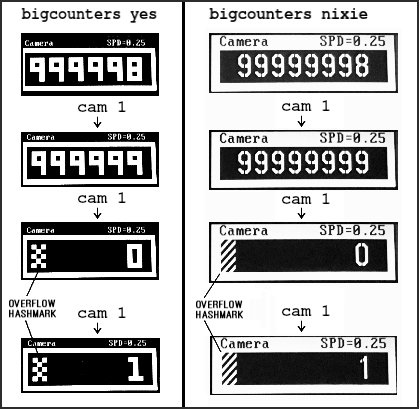 ..or in "ASCII art", that would be:
######################################################################
#### ## ## ##
### ## ## #### ##
## ## ## # ## ## ##
## ## ## ## ## ## ##
#### ## ## ## ## ##
### ## ## ## ## ##
## ## ## # ## ## ##
## ## ## ## #### ##
#### ## ## ##
######################################################################
Similarly, negative underflows (counts below zero) unclock to
zero displaying a negative sign prefix.
For 'bigcounters yes', counter progression works this way, where
'//' represents the hashmark:
Actual Frame 'bigcounter yes' Display
------------ ------------------------
-100,002 // -2 <-- wraps to -2, shows hashmark
-100,001 // -1 <-- wraps to -1, shows hashmark
-100,000 // 0 <-- wraps to -0, shows hashmark
-99,999 -99,999
-98,999 -98,999
: :
-1 -1
0 0
1 1
: :
999,998 999,998
999,999 999,999
1,000,000 // 0 <-- wraps to 0, shows hashmark
1,000,001 // 1 <-- wraps to 1, shows hashmark
: :
For 'bigcounters nixie', in version K2.10 and up, counter progression
works this way:
Actual Frame 'bigcounters nixie' Display
------------ ---------------------------
: :
-10,000,002 // -2 <-- wraps to -2, shows hashmark
-10,000,001 // -1 <-- wraps to -1, shows hashmark
-10,000,000 // -0 <-- wraps to -0, shows hashmark
-9,999,999 -9,999,999
-9,999,998 -9,999,998
: :
-1 -1
0 0
1 1
: :
99,999,998 99,999,998
99,999,999 99,999,999
100,000,000 // 0 <-- wraps to 0, shows hashmark
100,000,001 // 1 <-- wraps to 1, shows hashmark
100,000,002 // 2 <-- wraps to 2, shows hashmark
: :
This 'clock over' behavior is only true of the display..
the software still internally keeps track of actual positions,
so that commands like 'cam >2000000' will still work correctly.
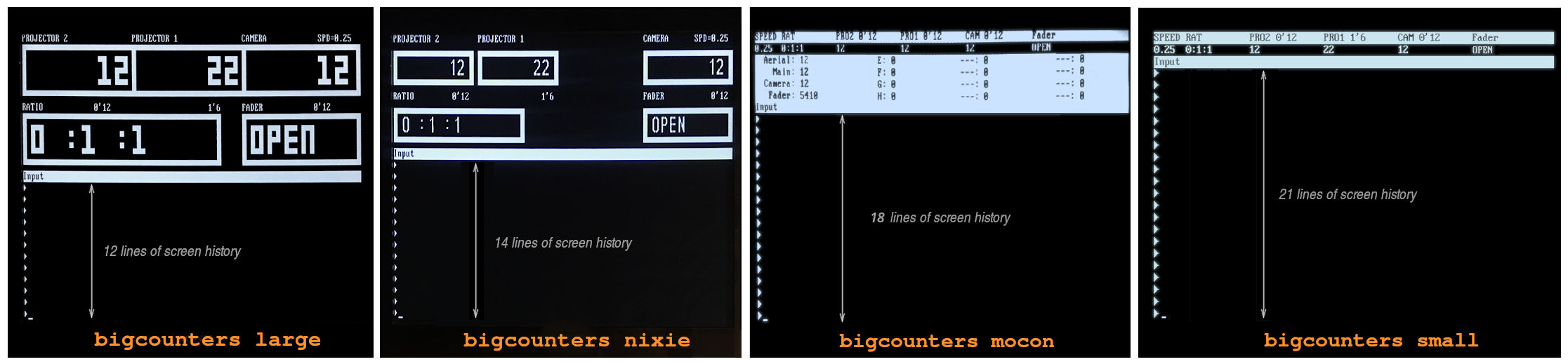
Note that 'bigcounters small' and 'bigcounters mocon' does not
clip digits at all, and can display the full abilities of 32bit
numbers.
> Use 'bigcounters small' to maximize operator's screen history
(21 lines of screen history)
> Use 'bigcounters mocon' monitors all channels for motion control moves.
(18 lines of screen history)
> Use 'bigcounters nixie' for normal printing and medium sized counters.
(14 lines of screen history)
> Use 'bigcounters large' for normal printing and largest counters.
(12 lines of screen history)
..or in "ASCII art", that would be:
######################################################################
#### ## ## ##
### ## ## #### ##
## ## ## # ## ## ##
## ## ## ## ## ## ##
#### ## ## ## ## ##
### ## ## ## ## ##
## ## ## # ## ## ##
## ## ## ## #### ##
#### ## ## ##
######################################################################
Similarly, negative underflows (counts below zero) unclock to
zero displaying a negative sign prefix.
For 'bigcounters yes', counter progression works this way, where
'//' represents the hashmark:
Actual Frame 'bigcounter yes' Display
------------ ------------------------
-100,002 // -2 <-- wraps to -2, shows hashmark
-100,001 // -1 <-- wraps to -1, shows hashmark
-100,000 // 0 <-- wraps to -0, shows hashmark
-99,999 -99,999
-98,999 -98,999
: :
-1 -1
0 0
1 1
: :
999,998 999,998
999,999 999,999
1,000,000 // 0 <-- wraps to 0, shows hashmark
1,000,001 // 1 <-- wraps to 1, shows hashmark
: :
For 'bigcounters nixie', in version K2.10 and up, counter progression
works this way:
Actual Frame 'bigcounters nixie' Display
------------ ---------------------------
: :
-10,000,002 // -2 <-- wraps to -2, shows hashmark
-10,000,001 // -1 <-- wraps to -1, shows hashmark
-10,000,000 // -0 <-- wraps to -0, shows hashmark
-9,999,999 -9,999,999
-9,999,998 -9,999,998
: :
-1 -1
0 0
1 1
: :
99,999,998 99,999,998
99,999,999 99,999,999
100,000,000 // 0 <-- wraps to 0, shows hashmark
100,000,001 // 1 <-- wraps to 1, shows hashmark
100,000,002 // 2 <-- wraps to 2, shows hashmark
: :
This 'clock over' behavior is only true of the display..
the software still internally keeps track of actual positions,
so that commands like 'cam >2000000' will still work correctly.
Note that 'bigcounters small' and 'bigcounters mocon' does not
clip digits at all, and can display the full abilities of 32bit
numbers.
> Use 'bigcounters small' to maximize operator's screen history
(21 lines of screen history)
> Use 'bigcounters mocon' monitors all channels for motion control moves.
(18 lines of screen history)
> Use 'bigcounters nixie' for normal printing and medium sized counters.
(14 lines of screen history)
> Use 'bigcounters large' for normal printing and largest counters.
(12 lines of screen history)
 BUGS/TODO
Needs a -cont flag, to continue rep commands that
didn't finish shooting, ie. rep >50 dxo 10 rep -cont >60
SEE ALSO
RAT(OPCS) - set the shooting ratio for the REP command
REP(OPCS) - shoot current projector/camera shooting ratio
PROPHASE(OPCSDEFS) - sets projector phase adjustment for 1:1 shooting
MATH(DOCS) - math expressions (for use in frame specifications)
SYNTAX(OPCS) - Online calculator and OPCS math expression syntax
ORIGIN
Gregory Ercolano, Los Feliz California 11/29/89
BUGS/TODO
Needs a -cont flag, to continue rep commands that
didn't finish shooting, ie. rep >50 dxo 10 rep -cont >60
SEE ALSO
RAT(OPCS) - set the shooting ratio for the REP command
REP(OPCS) - shoot current projector/camera shooting ratio
PROPHASE(OPCSDEFS) - sets projector phase adjustment for 1:1 shooting
MATH(DOCS) - math expressions (for use in frame specifications)
SYNTAX(OPCS) - Online calculator and OPCS math expression syntax
ORIGIN
Gregory Ercolano, Los Feliz California 11/29/89